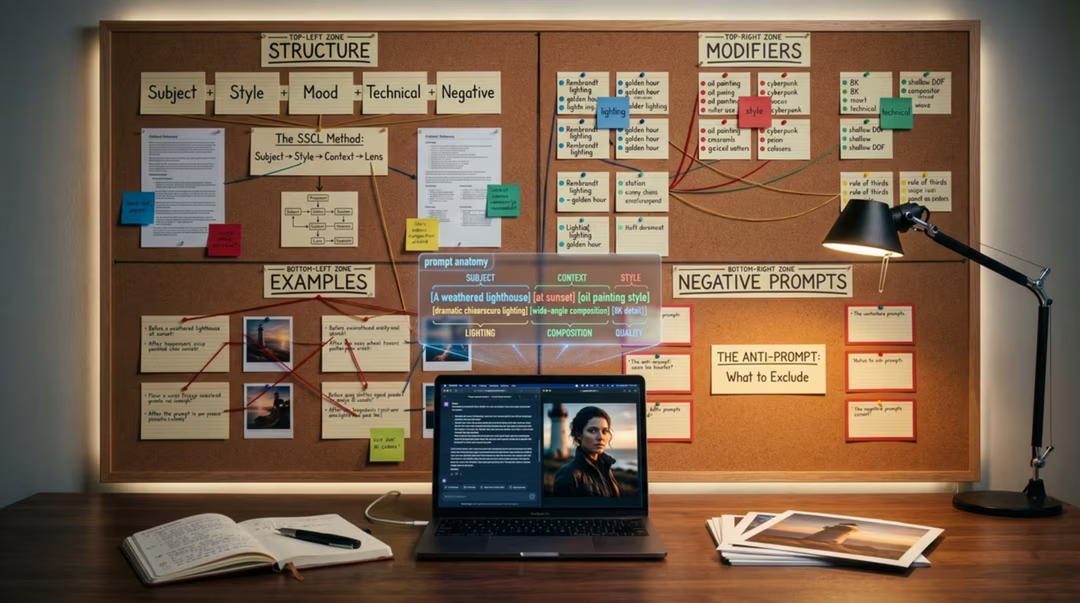
There is a persistent myth that prompting is a set of secret words. It is not. The people who consistently get good images are not hoarding magic phrases — they are describing pictures more precisely than everyone else, and they are correcting deliberately when the first attempt misses.
This guide sets out a method rather than a word list. You will learn a four-block structure, how to debug an image visually, how the major models differ in what they reward, and how to handle the harder cases: readable text, consistent characters, and images that do not immediately read as machine-made.
Key takeaways
- Describe what a camera or a material would do. Adjectives about quality do almost nothing.
- SSCL — Subject, Scene, Composition, Light — covers the four things models most need to know.
- A prompt is written for a specific model. Porting it without adaptation is the most common cause of disappointment.
- Change one variable per iteration, or you will never learn which change helped.
- Negative prompts remove recurring artefacts; they are a poor way to describe what you actually want.
- Realism comes from imperfection: natural skin, plausible light, slightly imperfect framing.
What prompting means now
In a multi-model ecosystem, prompting has two halves. The first is description: saying clearly what should be in the frame. The second is direction: saying how it should be seen, lit and framed. Most beginners do the first and skip the second.
Newer conversational tools have absorbed some of the burden. You can write an ordinary sentence to GPT Image 2 or Nano Banana 2 and get something sensible. But "sensible" is the average of everything the model knows. Direction is how you leave average behind.
So the skill has shifted upward. Less syntax, more judgement. The valuable question is no longer "what is the right keyword" but "what exactly is wrong with this image, and which word fixes it".
Why one prompt behaves differently everywhere
Each model has a different training history, a different text encoder and a different set of built-in aesthetic tendencies. Midjourney will beautify. FLUX will take you literally. Leonardo will look for a production-ready asset. Nano Banana will aim for plausible realism.
That means a prompt tuned for one system frequently underperforms elsewhere, and the fault is not the prompt. It is the translation. The model-specific prompting guide rewrites one scene for six tools so you can see the pattern.
| Model | Rewards | Struggles with | Prompt style |
|---|---|---|---|
| Midjourney | Mood, medium, art-historical framing | Precise counts and readable text | Short, evocative, comma-separated |
| Leonardo AI | Structured scene description, asset briefs | Loose poetic phrasing | Descriptive and orderly |
| FLUX.2 | Camera and material specificity | Vague artistic direction | Literal, technical, complete sentences |
| GPT Image 2 | Instructions, constraints, revisions | Bulk stylistic exploration | Conversational, iterative |
| Nano Banana 2 | Plain natural language, edits | Highly stylised art direction | Everyday sentences |
| Ideogram 3 | Explicit quoted text, layout terms | Fine-art abstraction | Layout-led with quoted copy |
The SSCL formula
SSCL is a checklist disguised as a formula: Subject, Scene, Composition, Light. If all four are present, your prompt is already better than most. Everything else — medium, mood, palette, constraints — is refinement on top.
Subject is who or what, described concretely. Scene is where and when. Composition is how the frame is arranged, including lens and distance. Light is the quality, direction and colour of illumination, which does more for the feel of an image than any style keyword.
Subject: a retired fisherman mending a net, weathered hands, heavy wool jumper Scene: a small stone harbour in western Ireland, early morning, low tide Composition: three-quarter view, waist-up, 50mm lens, subject on the right third Light: soft grey overcast light, faint cool cast, no direct sun, gentle contrast
Flatten the four blocks into one sentence for tools that expect a single line. The order still helps.
The chapter on the SSCL prompt formula works through examples for five different tools, including how to compress the structure when a model prefers brevity.
Eight levers: subject to constraints
Beyond the four blocks, eight levers give you fine control. Subject detail, scene context, composition, light, lens, medium, mood and constraints. Pull one at a time and you can steer almost any image toward a brief.
Lens language is the most underused. "85mm portrait lens, f/1.8" tells the model about compression, depth and distance in a single phrase. Medium is next: photograph, gouache, screen print and cyanotype are wildly different instructions.
Constraints are the quiet workhorse. "No text", "single subject", "plain background", "no visible logos" prevent the clutter that models add when left to their own devices.
A ceramicist trimming a bowl on a wheel [subject], in a small studio with shelves of bisque ware [scene], close three-quarter shot from slightly above [composition], warm side light from a single window [light], 35mm at f/2 [lens], documentary photograph [medium], quiet concentration [mood], no text, no additional people, plain rear wall [constraints]
Written with labels here for clarity. In the tool, delete the bracketed labels and keep the order.
Iteration and visual debugging
Treat a disappointing image as evidence rather than a failure. Look at it and name the specific fault: the light is flat, the pose is stiff, the background competes, the palette is muddy, the materials look like plastic.
Then fix exactly that one thing. Regenerating with a completely rewritten prompt is the equivalent of restarting a document because of a typo. You lose everything that was already working.
Keep a note of the change and the effect. After a dozen deliberate iterations you will have an internal model of how your chosen tool responds, which is worth far more than any list of keywords.
Debug order that usually works
Light first, then composition, then subject detail, then material and texture, then palette. Fixing light early often removes problems you were about to attribute to something else.
Model-specific prompting
Once your structure is solid, adapt it. For Midjourney, compress to strong visual nouns and let the model handle beauty. For FLUX.2, expand into precise, literal description and technical camera detail.
For GPT Image 2, lead with the instruction and the constraint, then refine conversationally. For Nano Banana 2, write the sentence you would say to a competent assistant, then correct it in the next message.
For Ideogram 3, put the text in quotation marks and describe the layout around it. For Leonardo, describe the asset as a brief: what it is for, what style family it belongs to, and what must stay consistent.
Midjourney: abandoned seaside funfair at dusk, peeling paint, low fog, cinematic teal and rust palette, 35mm FLUX.2: A closed seaside funfair photographed at dusk. Peeling paint on a carousel, fog at ankle height, wet tarmac reflecting a single sodium lamp. 35mm lens, f/4, ISO 800, natural available light, slight grain. GPT Image 2: Create a photograph of a closed seaside funfair at dusk. Keep it moody but not stylised. Include one sodium lamp as the only light source, and leave the sky empty of birds.
Same scene, three dialects. The information is identical; the phrasing is not.
Negative prompting
Negative prompts tell a model what to avoid. Where supported, they are best used surgically: remove the artefact you keep seeing, not a long inherited list of words copied from a forum.
Overloaded negative prompts can flatten an image, because you are constraining the model in dozens of directions at once. Three or four targeted terms usually beat thirty.
In conversational tools there is often no negative field at all. Ask directly instead: "remove the extra chair", "no text anywhere in the image", "less blur in the background".
Anti-AI-look and realism
Generated images betray themselves in predictable ways: over-smoothed skin, waxy highlights, impossible light directions, faces that are too symmetrical, backgrounds that repeat, and depth-of-field blur applied like a filter rather than a lens.
The remedy is to describe reality's imperfections. Visible pores and fine lines. A single believable light source. Slightly off-centre framing. Natural grain. A background that is merely present rather than composed.
Realism techniques should never be used to deceive. If an image could be mistaken for documentary evidence, label it. The full treatment is in anti-AI-look prompting.
Natural skin with visible texture and fine lines, no retouching, single window light source from camera left, slight motion in the hands, imperfect framing, mild sensor grain, muted colour, everyday clothing with visible wear
Add these as a suffix to an existing portrait prompt rather than replacing your subject description.
Responsible use
Do not create realistic images of identifiable people in situations that did not occur, and do not present synthetic imagery as photojournalism. Disclose AI involvement where a reasonable viewer would want to know.
Text inside images
Text is still the hardest thing to get right, because letterforms must be exactly correct rather than merely plausible. Ideogram 3 leads here, and GPT Image 2 handles short strings well.
Keep the copy short, quote it explicitly, and describe where it sits. "The words 'Open Late' in a bold condensed sans, centred on the awning" gives the model far more to work with than "a sign".
For anything commercial, plan to set final type in a design tool. Generate the image, then typeset over it. That single habit removes most typography disappointment.
A vertical poster for a jazz night. The words "Tuesday Sessions" in a bold condensed sans across the upper third, and "Doors 8pm" in small caps at the base. Warm ochre background, single trumpet silhouette, generous margins, print poster layout.
Two short strings, both quoted, both placed. Do not ask for a paragraph.
Character consistency
Consistency comes from repetition and reference. Write a fixed character description — age, build, hair, distinguishing features, wardrobe — and paste it verbatim into every prompt without rewording.
Add a reference image where the tool supports one, and keep the seed fixed if the tool exposes it. Then vary only pose, framing and setting. The moment you rewrite the description, the face drifts.
Social, editorial, product and anime
Different outputs need different emphases. Social graphics need contrast, a clear focal point and space for overlaid type. Editorial images need a point of view and room for a headline. Product shots need believable materials and controlled reflections.
Anime and manga work has its own grammar entirely: line weight, cel shading, panel structure and expression language. Our anime and manga prompt guide covers Nano Banana and Niji workflows, and the prompt modifiers cheat sheet is the reference you will keep open while working.
Chapters in this guide
Six chapters take each part of the method further. The first is the structural foundation; the rest can be read in any order.
- The SSCL Prompt Formula ExplainedThe four-block structure, with worked examples for five tools.
- 50 Midjourney V8 Prompt TemplatesFifty copy-ready prompts across eight categories, plus adaptation notes.
- Model-Specific Prompting Guide: Midjourney vs Leonardo vs FLUXOne scene rewritten six ways, with a side-by-side table.
- Anime and Manga AI Prompt Guide: Nano Banana and Niji WorkflowsCharacters, panels, backgrounds and original-character practice.
- AI Prompt Modifiers Cheat SheetDense tables for light, lens, style, mood, texture and colour.
- Anti-AI-Look Prompting: Realism Hacks and Natural Image TechniquesThe specific faults that give AI images away, and their fixes.
Frequently asked questions
Is prompt engineering still a useful skill in 2026?
Yes, though it looks different. Models handle ordinary language better than they used to, so the value has moved from syntax tricks to art direction: knowing what to ask for, and recognising why a result is not working.
Why does the same prompt give different results in different tools?
Each model was trained differently and weights language differently. Midjourney leans into aesthetic terms, FLUX rewards technical precision, and conversational models interpret plain instructions. A prompt is written for a model, not for the whole industry.
What is the SSCL formula?
SSCL stands for Subject, Scene, Composition, Light. It is a four-block structure that ensures every prompt answers the four questions image models most need answered before you add style, medium and mood on top.
Do negative prompts still matter?
They matter where the tool supports them, and they work best for removing recurring artefacts rather than for describing what you want. In conversational tools it is usually more effective to ask for the correction directly in the next message.
How long should a prompt be?
Long enough to remove ambiguity, short enough that every word earns its place. Around twenty-five to sixty words suits most image briefs. Beyond that, later terms often carry less influence than you expect.
How do I keep a character consistent across images?
Use a fixed written character description, reuse it verbatim, add a reference image where the tool supports one, and keep the seed fixed if the tool exposes it. Change only pose, framing and setting between generations.
Where to go next
Read the SSCL chapter first if you want the structure in your hands within ten minutes. If you already prompt confidently, the model-specific chapter will save you the most time.