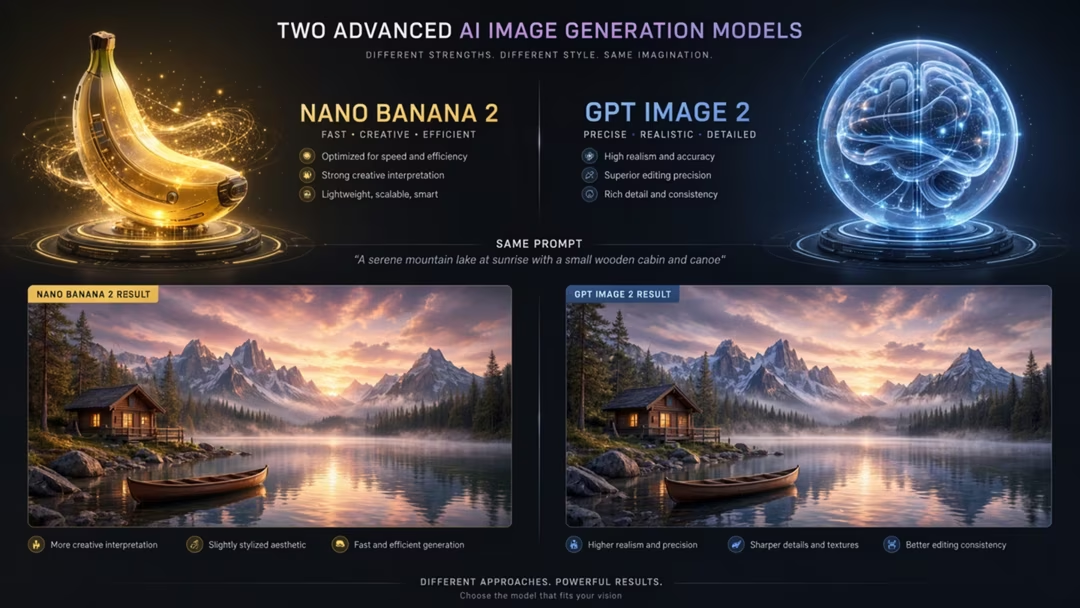
This is the comparison most people actually need. Neither tool requires a subscription decision up front, neither demands prompt syntax, and both are reachable inside apps you may already use.
The difference is temperament. Nano Banana 2 is quick and obliging. GPT Image 2 is careful and literal. Which you prefer depends on whether you are exploring or executing.
Key takeaways
- Nano Banana 2: faster, free tier in the Gemini app, excellent for everyday realism and quick edits.
- GPT Image 2: reasoning-oriented, better at instruction-heavy briefs, counts and short text.
- Both edit conversationally, which is their shared advantage over prompt-only tools.
- Neither is a universal winner. The recommendation below is by user type.
- Access, allowances and terms can change for both.
Access and free tiers
Nano Banana 2 is reached through the Gemini app and has a free tier, which is a large part of why it is currently positioned as a strong all-round free recommendation.
GPT Image 2 sits in ChatGPT, with availability and allowances depending on your plan. Both products change their limits periodically, so verify before planning around them.
Ease of use
Both accept ordinary sentences. Nano Banana 2 is marginally more forgiving of casual phrasing, and its speed encourages the trial-and-error learning that beginners benefit from.
GPT Image 2 rewards a slightly more considered brief. Tell it the purpose and the constraints, and it uses them; give it three words and you have wasted its main advantage.
Realism and image quality
Both produce believable everyday photography. Nano Banana 2 is often preferred for natural-looking realism at speed, particularly portraits, interiors and lifestyle scenes.
GPT Image 2 is comparable on quality and stronger when the scene is complicated, because it holds more elements in correct relation to each other.
For technical photorealism at the highest level, FLUX.2 remains the specialist, as covered in the pillar comparison.
A realistic photograph of a woman in a linen apron watering plants on a small balcony, early morning light from the left, natural skin texture, 50mm, muted natural colour, unposed, no text
Run this in both and compare. It is the fastest way to learn which you prefer.
Prompt following
This is the clearest difference. Ask for "three green bottles and one amber bottle, the amber one on the right" and GPT Image 2 is more likely to deliver exactly that.
Nano Banana 2 handles simple instructions well but is more prone to approximating counts and positions when a brief becomes crowded.
A wooden shelf holding exactly four items, left to right: a blue ceramic jug, two identical white bowls stacked, and a small brass clock. Plain pale wall behind, soft even light, nothing else on the shelf, no text.
Count the objects in the result. This single test separates the two tools quickly.
Editing and iteration
Both edit through conversation, which is a genuine advantage over prompt-only tools. The technique is identical: name what changes, name what must not.
Nano Banana 2 suits rapid casual edits — swap the background, change the season, remove an object. GPT Image 2 suits edits with strict preservation requirements.
Keep the composition, lighting and colour exactly as they are. Replace the plastic watering can with a galvanised metal one of the same size, match the existing shadow, and change nothing else in the image.
The final clause matters more than the rest. Without it, both tools will drift.
Text rendering
GPT Image 2 handles short strings more reliably, which makes it the better of the two for a label, a headline or a simple sign.
Neither replaces Ideogram 3 for typographic work. If words are the point of the image, use the specialist, as set out in best AI tool for logos and text-in-images.
| Criterion | Nano Banana 2 | GPT Image 2 |
|---|---|---|
| Access | Gemini app, free tier | ChatGPT, plan dependent |
| Speed | Faster | Slower, more considered |
| Everyday realism | Strong | Strong |
| Complex instructions | Good | Stronger |
| Counts and positions | Approximate under load | More reliable |
| Short text | Moderate | Stronger |
| Editing | Fast and casual | Precise and constrained |
| Beginner friendliness | Very high | High |
Model availability, product features, pricing, and usage terms can change. Check the official product page before making a purchasing decision.
Social graphics and product imagery
For social backgrounds and lifestyle imagery, Nano Banana 2's speed wins: you can produce a week of material in one sitting.
For product imagery with specific requirements — a particular arrangement, a specific count, a label that must be legible — GPT Image 2's precision saves more time than its slower pace costs.
A simple rule
If you would describe the job as "something like this", use Nano Banana 2. If you would describe it as "exactly this", use GPT Image 2.
Recommendation by user type
Complete beginners: start with Nano Banana 2. Free, fast, forgiving.
Social creators: Nano Banana 2 for volume, with a design tool for typography.
Marketers with briefs: GPT Image 2, because compliance with a specification matters more than speed.
Small businesses: Nano Banana 2 for cost, moving to GPT Image 2 when a task keeps failing on detail.
Advanced users: both, plus a specialist. Explore in one, execute in the other, finish in Ideogram or FLUX as the job requires.
There is no universal winner here, and anyone who declares one is simplifying for the sake of a headline.
Frequently asked questions
Which is better for beginners?
Nano Banana 2 in the Gemini app is usually the gentler start because it is fast, free to try and forgiving of casual phrasing.
Which follows complex instructions better?
GPT Image 2 tends to handle instruction-heavy briefs more reliably, including counts, spatial relationships and short text, because it forms an interpretation before rendering.
Which is faster?
Nano Banana 2 is generally quicker, which matters when you want many options rather than one careful result.
Which is better for editing an existing image?
Both are strong. Nano Banana 2 suits fast casual edits; GPT Image 2 suits edits with strict constraints about what must not change.
Do I have to choose?
No. Many people explore in Nano Banana 2 and finish anything instruction-heavy in GPT Image 2. Both are conversational, so moving between them costs little.
Return to the pillar guide for the full comparison: nine tools across realism, text, editing, speed, commercial safety and cost.
Continue the series
The other chapters in the AI Image Tools comparison guide.