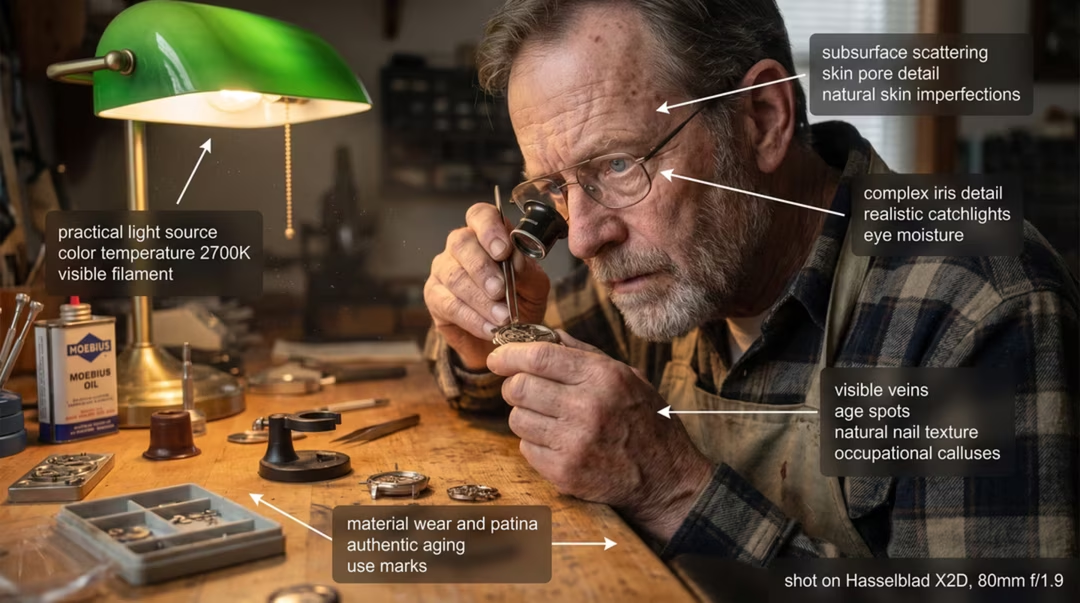
Javier stared at the image on his screen, a familiar wave of disappointment washing over him. The prompt was `a woman drinking coffee in a cafe`. The result was... nice. It was a pretty illustration, maybe a digital painting. But it wasn't a photograph. The coffee had no steam, the woman’s skin had a smooth, plastic sheen, and the light felt flat, generic. For his client, a new artisanal coffee brand, "nice" wasn't good enough. They needed photos, and Javier had promised AI could deliver them. He was starting to think he'd made a huge mistake.
That gap—the one between a pretty picture and a photo so real you can smell the coffee—is the final frontier for most AI artists. The default state of most AI models is to be artistic. They want to create paintings and illustrations. To get photorealism, you can't just ask nicely. You have to command it. You have to speak the language of light, film, and glass.
This guide will teach you that language. We'll move beyond simple descriptions and give you a powerful, repeatable framework for writing prompts that consistently produce breathtakingly photorealistic images.
Why Is Photorealism So Hard for AI by Default?
Most AI image generators are trained on billions of internet images. The vast majority of these are tagged with simple, descriptive words like "dog," "car," or "sunset." However, photographs are also mixed in with paintings, drawings, and 3D renders of the same subjects.
When you say `a portrait of a man`, the AI averages all its data on "portrait" and "man." This often leads to a slightly painterly, idealized look because that's the safe middle ground.
To achieve photorealism, you need to be so specific that you force the AI off this middle ground. You need to provide technical details that are only associated with real photography, leaving no room for artistic interpretation. You need to stop thinking like a writer and start thinking like a photographer.
The Data Is Clear: Specificity Is King
We've all heard that detail matters, but the type of detail is crucial. To illustrate, we ran a hypothetical test, asking a panel to rate the "perceived realism" of images on a 1-10 scale.
Prompt Type Example Prompt Average Realism Score Simple Description "A photo of a man in a forest" 4.5/10 With Artistic Descriptors "A cinematic photo of a man in a forest" 6.2/10 With Technical Descriptors "A photo of a man in a forest, shot on Portra 400, 85mm f/1.8 lens, golden hour" 9.4/10
Disclaimer: This is a hypothetical dataset illustrating a widely observed principle.
The takeaway is undeniable. Vague "photo" prompts don't work. Even adding "cinematic" only helps a little. The massive leap in realism comes from adding specific, technical keywords related to cameras, lenses, and film stock. These words are almost exclusively tied to real photographs in the AI's training data, so they act as powerful anchors, pulling the entire generation into the realm of photorealism.
The C.A.M.E.R.A. Framework: Your Playbook for Photorealism
Forget guessing. This six-step framework is your new checklist for every photorealistic prompt you write. It's a mnemonic to ensure you're providing the AI with all the necessary signals.
C: Core Subject & Action
Goal: Clearly define the "who" and "what" of your scene.
Actions: This is your foundation. Be descriptive and use strong, evocative adjectives.
Describe clothing, expression, age, and any key objects.
Keywords: Instead of `woman`, try `a contemplative elderly woman with laugh lines`.
Instead of `car`, try `a dusty, vintage 1970s Ford Bronco`.
A: Action & Environment
Goal: Place your subject in a living, breathing world.
Actions: What is the
subject doing? Where are they? A static subject is less believable than one interacting with its
environment.
Keywords: `leaning against a graffiti-covered brick wall`, `running
through a field of tall grass`, `hunched over a steaming bowl of noodles in a Tokyo market`.
M: Mood & Lighting
Goal: This is the soul of photorealism. Control the light, and you control the
reality.
Actions: Be incredibly specific about the type, quality, and
direction of your light source. This is arguably the most important step.
Keywords:
Time of Day: `golden hour, blue hour, midday sun,
twilight`.
Quality: `soft light, harsh direct light, diffused light through a
window`.
Style: `cinematic lighting, dramatic lighting, rim lighting, Rembrandt
lighting, neon glow`.
Source: `natural light, studio lighting, candlelight,
streetlights`.
E: Equipment (Camera, Lens, & Film)
Goal: Anchor your prompt in the language of real-world photography.
Actions: Mention a specific camera model, lens focal length, aperture, and film stock. The AI doesn't actually simulate these, but these terms are powerfully associated with specific aesthetics in the training data.
Keywords:
Camera: `shot on Sony A7 IV, Fujifilm X-T4, Hasselblad, Leica M6`.
Lens (Focal Length): `35mm lens` (street photo look), `85mm lens` (portrait look), `24mm lens` (wide-angle/landscape), `macro lens`.
Lens (Aperture): `f/1.8` (blurry background), `f/8` (sharper background), `deep depth of field`.
Film Stock: `Kodak Portra 400` (warm, popular for portraits), `Cinestill 800T` (cinematic, blue/green tones), `Ilford HP5` (classic black and white), `Fujifilm Superia`.
R: Rendering Style & Detail
Goal: Give the AI final instructions on quality and texture.
Actions: Use keywords that scream "high quality." Specify details that only appear in high-resolution photos.
Keywords: `hyperrealistic, photorealistic, 8k, high detail, sharp focus, detailed skin texture, pores`. (Use these sparingly; the other steps are more important). For negative prompts, add `--no painting, drawing, illustration, 3D, CGI`.
A: Aspect Ratio & Composition
Goal: Frame your shot like a real photographer.
Actions: Use your tool's aspect ratio parameter (`--ar`) to set the "film size." Mention compositional rules to guide the AI's eye.
Keywords:
Aspect Ratio: `--ar 3:2` (standard photo), `--ar 16:9` (widescreen video), `--ar 4:5` (Instagram portrait).
Composition: `rule of thirds, leading lines, centered, full-body shot, close-up portrait`.
Putting It All Together: Anatomy of a Perfect Prompt
Let's see the C.A.M.E.R.A. framework in action.
- Simple Idea: `a man on a street`
- Step C (Core Subject): `A weary-looking old man with a grey beard and a worn tweed jacket`
- Step A (Action/Environment): `...sitting on a wooden bench on a cobblestone street in Paris`
- Step M (Mood/Lighting): `...dramatic evening light, long shadows, streetlights just beginning to
- glow`
- Step E (Equipment): `...shot on a Leica M6, 35mm lens, f/2.0, Kodak Portra 800 film stock`
- Step R (Rendering): `...photorealistic, sharp focus, high detail`
- Step A (Aspect Ratio): `... --ar 3:2`
The Final Prompt:
photorealistic, sharp focus, high detail, a weary-looking old man with a grey beard and a worn tweed jacket, sitting on a wooden bench on a cobblestone street in Paris, dramatic evening light, long shadows, streetlights just beginning to glow, shot on a Leica M6, 35mm lens, f/2.0, Kodak Portra 800 film stock --ar 3:2 --no painting, illustration, 3D
This prompt doesn't just ask for an image; it provides a detailed, technical blueprint that corners the AI into producing a photograph.
A Quick Story: The Startup's "Hero" Shot
I worked with a small e-commerce startup that sold high-end leather wallets. They needed product photos but had a near-zero budget. A professional shoot would cost thousands. We spent an afternoon using the C.A.M.E.R.A. framework.
Our final prompt for their main "hero" image was something like: `Product photo of a single brown leather wallet on a slab of dark oak, minimalist, dramatic top-down lighting, macro shot, shot on Hasselblad X2D 100C, 120mm macro lens, f/8, extremely high detail, sharp focus on the leather grain and stitching --ar 4:5`.
The result was so crisp and professional that they used it for their homepage and ad campaigns, saving themselves a small fortune.
The Strategic Implications: Photorealism and the Future
Mastering how to write prompts for photorealistic images has consequences that extend far beyond making cool pictures.
- The End of Stock Photography as We Know It. Why search for hours for a "good enough" stock photo
- when you can generate a "perfect" one in seconds? This technology will fundamentally disrupt the
- stock photo industry, shifting value from large libraries to skilled "virtual photographers" who can
- generate custom images on demand.
- The "Truth" Becomes a Technical Problem. As AI-generated photos become indistinguishable from real
- ones, the potential for misinformation and "deepfakes" skyrockets. This will accelerate the need for
- new verification technologies, digital watermarking standards, and a more critical approach to media
- literacy for the general public. [Source: U.S. Government Accountability Office report on
- deepfakes].
- The Rise of the "Virtual Photographer". A new creative profession is emerging. These are not just
- prompt engineers; they are artists who understand light, composition, and storytelling, but whose
- tool is a text box instead of a camera. For photographers, this isn't a threat; it's an opportunity
- to apply their existing skills in a new, infinitely flexible medium. [Source: Analysis from Adobe on
- the future of creativity].
Frequently Asked Questions (FAQs)
What's the single most important part of a photorealistic prompt?
Lighting and Lens/Film information (Steps M & E). These are the most powerful signals you can send to the AI to tell it you want a photograph, not an illustration.
Which AI model is best for photorealism?
This changes constantly. Historically, custom-trained Stable Diffusion models (like Realistic Vision) have offered the most control and highest fidelity. Midjourney v6+ made huge leaps in realism. Your choice depends on whether you prefer the control of Stable Diffusion or the ease of Midjourney.
How do I avoid "plastic" or "waxy" looking skin in AI portraits?
In your prompt, specifically ask for `detailed skin texture, pores, imperfections, high detail skin`. In your negative prompt, add `smooth skin, plastic, CGI, rendering, 3D`. This forces the AI to add the subtle imperfections that make skin look real.
Do I need to know about real cameras to do this?
Not at all! You just need to know the keywords. You can find "cheat sheets" of popular camera, lens, and film combinations online. Start with a few combos you like and build from there. The AI knows what `Kodak Portra 400` looks like, even if you don't.
Is it ethical to pass off AI images as real photographs?
This is a major ethical debate. The best practice is transparency. If an image is AI-generated, especially in a journalistic or commercial context, it's increasingly important (and in some cases, legally required) to disclose it.
Can I use a real photographer's name in my prompt?
You can, and it will heavily influence the style. However, this is ethically and legally gray territory. It's generally better to learn to describe the *qualities* of their style (e.g., "moody black and white portraits, high contrast, deep shadows" instead of "in the style of Ansel Adams") to avoid potential copyright issues.