Key takeaways
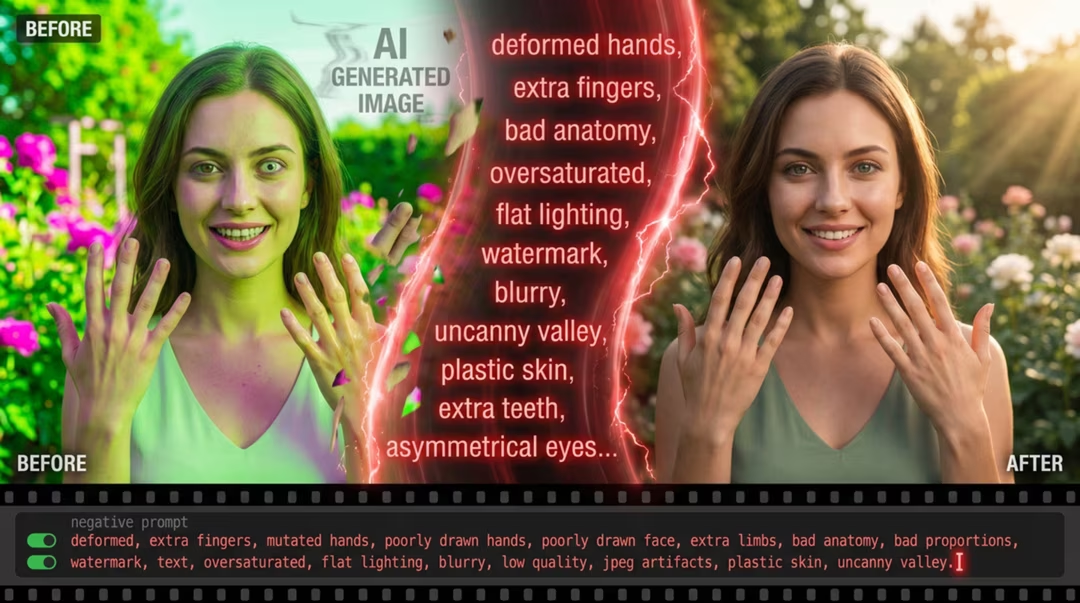
- A negative prompt steers by exclusion: “no text,” “no plastic skin,” “no flat lighting.”
- Stable Diffusion and Flux workflows support them natively; Midjourney uses
--no; ChatGPT-family models don’t. - Short, specific negatives work; long “curse lists” degrade quality.
- The best negative is often a positive re-wording of what you actually want.
What a negative prompt actually does
During sampling, the model is pushed toward your prompt and away from your negative. Think of it as a repelling force: it doesn’t paint “no text,” it reduces the probability of text-like patterns appearing. That’s why negatives work best against the model’s defaults — the things it adds out of habit, like watermarks, extra fingers, or glossy smoothing.
Which models support them
Stable Diffusion exposes a dedicated negative field. Flux supports negatives in most interfaces.
Midjourney translates the idea into the --no parameter with a short term list. ChatGPT and
Gemini image models have no negative channel — there, exclusion must be phrased positively in the main
prompt (“clean background, no props” becomes “a single object on an empty seamless backdrop”).
The VISIORA generator outputs a negative section and notes this exact model difference in its tooltip.
Useful negatives by use case
| Use case | High-value negatives |
|---|---|
| Portraits | plastic skin, airbrushed, extra fingers, asymmetrical eyes, heavy makeup |
| Product | floating object, multiple shadows, text, logos, fingerprints |
| Photography | hdr artifacts, oversaturated, cartoonish, watermark |
| Cinematic | flat lighting, video still look, soap-opera smoothness |
| Architecture | curved verticals, floating buildings, impossible geometry |
plastic smoothed skin, airbrushing, extra fingers, flat frontal flash, cluttered background, text, watermark
In Midjourney: --no plastic skin, extra fingers, text, watermark
When negatives backfire
- Listing what you want — “no beautiful lighting” removes the very thing you meant to keep. Negate the failure mode, not the goal.
- Curse lists — thirty terms pull the sample in too many directions and muddy everything. Cut to the top five.
- Negating concepts the model can’t separate — “no people” in a busy-street scene often removes the street too. Re-frame positively instead.
- Using negatives to fix a bad positive — if the main prompt is vague, no negative rescues it. Strengthen the positive first; see how to write prompts.
The positive rewrite test
Before adding a negative, try stating its opposite positively. “No dark shadows” → “soft even lighting.” If the positive works, you didn’t need the negative.
FAQ
Why does my model ignore the negative?
Either it lacks a negative channel (ChatGPT/Gemini), or the term is too abstract. Use concrete failure modes: “extra fingers,” not “bad anatomy.”
Do negatives reduce quality?
Over-long ones can. Each term costs sampling focus — spend it on the failures you actually see.
Should I reuse one master negative?
A small core (text, watermark) is fine to reuse. The rest should match the image — product negatives differ from portrait negatives.