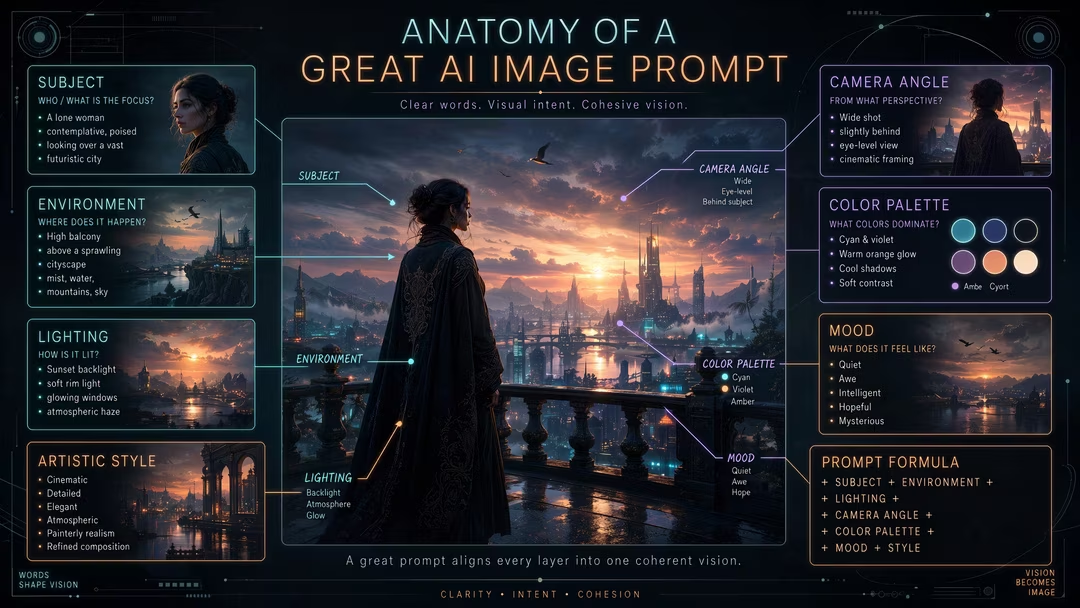
Key takeaways
- Structure makes prompts editable: change the lighting section and only the light changes.
- Subject and lighting carry most of the image; mood and details carry the soul.
- The negative prompt is a section too — exclusion is half of direction.
- Learn the sections once, and every prompt you read or write becomes legible.
Why structure beats paragraphs
A paragraph hides its decisions inside prose; a structured prompt labels them. When the render drifts, structure tells you exactly which phrase to touch. It also mirrors how vision models describe images back to you — which is why the generator’s output uses these exact sections.
The eleven sections
1. Subject
The anchor. Specific facts beat judgments: “a weathered fisherman coiling rope” over “a cool guy.” Swap this section to keep a style and change the story.
2. Composition
Framing and weight: “horizon on the upper third,” “subject anchored on the right third.” Often the difference between “similar” and “off.”
3. Environment
The scene around the subject. The easiest section to swap — relocating a subject is how you get a series from one look.
4. Lighting
The biggest mood driver. Always name direction and shadow behavior: “soft key from camera left, gentle falloff.”
5. Camera & lens
Distance, focal-length feel, depth of field. “85mm at f/1.8” isolates; “24mm from hip height” energizes.
6. Color
Two or three named anchors plus a contrast note: “burnt amber, deep teal, near-black; balanced contrast.”
7. Materials & texture
The realism layer: “board-marked concrete,” “frosted glass with tiny bubbles.” Texture words outperform resolution words.
8. Style
The aesthetic wrapper — photographic, cinematic, illustrated, rendered. One clear wrapper; mixed wrappers blur.
9. Mood
One emotional register: “quiet,” “tense,” “wry.” Models respond to mood more than most people expect.
10. Details
Small anchors: “distant birds,” “a coiled rope,” “rain droplets frozen mid-air.” One or two, never ten.
11. Negative prompt
What to exclude — clutter, text, plastic skin. For models without negative support, fold the key terms
into a --no parameter. See Negative Prompts
Explained.
Subject: lone figure at the pier’s end. Composition: horizon on the upper third, subject right third. Environment: calm harbor at dusk. Lighting: golden-hour backlight, warm rim, long reflections. Camera: 35mm, deep focus. Color: burnt amber, deep teal, near-black. Materials: weathered wood, rippled water. Style: cinematic photorealistic. Mood: quiet contemplation. Details: distant birds, coiled rope. Negative: cluttered skyline, flat light, text.
Assembling the final prompt
For natural-language models, join the sections into flowing sentences, subject first. For Midjourney, comma-join and append parameters. For Stable Diffusion, keep the positive/negative split. The generator does this conversion for you — but knowing the sections means you can edit either form confidently. For vocabulary per section, pair this with How to Write AI Image Prompts.
Editing rule
When a render disappoints, diagnose by section: is it a light problem, a palette problem, or a framing problem? Fix that section only. Cross-section edits teach you nothing.
FAQ
Do I need all eleven sections every time?
No. Subject + light + one palette anchor covers most needs. Add sections as the image demands precision.
Which section should I write first?
Subject, then lighting. Those two decisions constrain everything else sensibly.
Is structure useful for short prompts too?
Especially — a 20-word prompt that fills three slots beats a 100-word one that fills none.