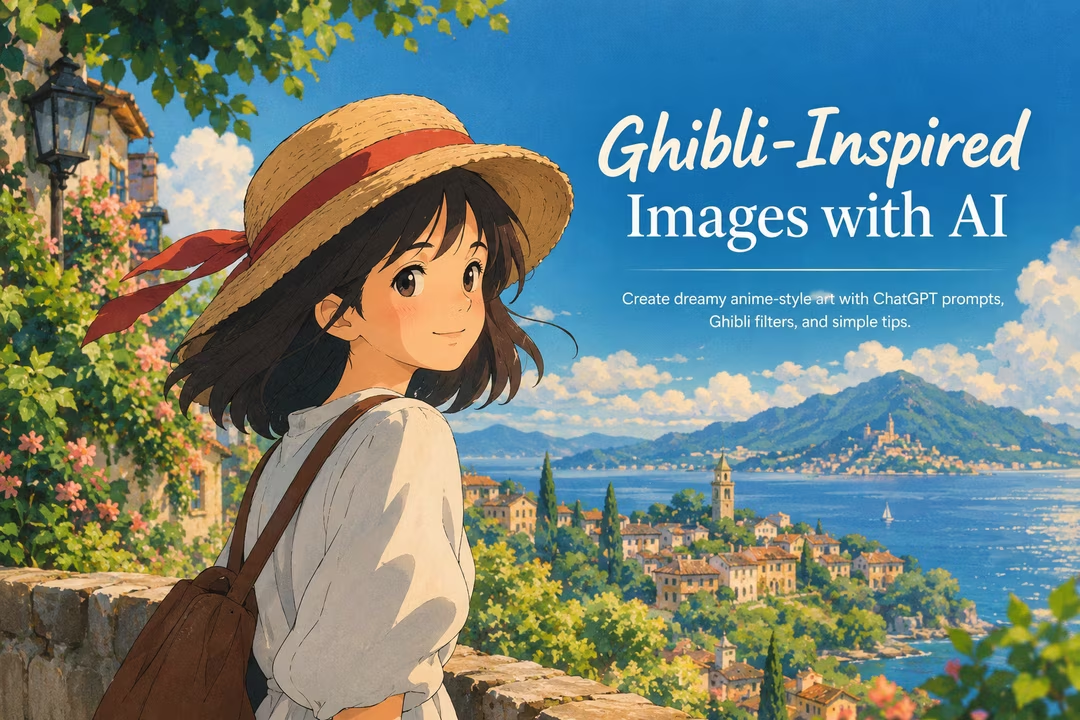
Studio Ghibli AI images quickly became one of social media’s most recognizable AI art trends. Suddenly, profile photos, pet pictures, travel snapshots, and family portraits were being reimagined as soft, hand-painted anime scenes with glowing skies, lush landscapes, and expressive characters.
The appeal is easy to understand. Ghibli-inspired images combine nostalgia, warmth, fantasy, and everyday beauty. A simple photo of someone walking down a street can become a cinematic scene filled with golden sunlight, whimsical details, and storybook atmosphere.
As people experimented with image-generation tools, the Ghibli AI trend spread rapidly across platforms such as X, Instagram, TikTok, and Facebook. The wave of interest also coincided with reported spikes in ChatGPT traffic and usage as users tested image-generation features and shared their results. While it is difficult to attribute traffic changes to one trend alone, the viral demand showed how strongly people respond to nostalgic, anime-style artwork.
This guide explains what Studio Ghibli AI images are, how to create Ghibli-inspired images with AI, and how to write a better ChatGPT Ghibli prompt for more polished results.
What Are Studio Ghibli-Style AI Images?
Studio Ghibli AI images are AI-generated or AI-transformed visuals that aim for a cozy, cinematic anime look often associated with hand-painted Japanese animation.
Rather than being a single technical “Ghibli filter,” the term usually refers to visual qualities such as:
- Soft watercolor-like textures
- Expressive but natural-looking faces
- Pastel, earthy, or sunlit color palettes
- Lush plants, clouds, villages, trains, forests, or cozy interiors
- Dreamy lighting and atmospheric depth
- A balance of ordinary life and gentle fantasy
- Detailed backgrounds that feel lived-in and emotional
Many users begin with a personal photograph, then ask an AI tool to transform it into AI Ghibli art. Others generate original scenes from a written description, such as a girl reading in a flower-filled train station or a cat sitting on a rainy apartment balcony.
It is worth remembering that “Studio Ghibli” is the name of a real studio and its work reflects the creativity of many artists. The best approach is to use the term as visual shorthand while describing the specific qualities you want: hand-painted animation, warm natural lighting, whimsical scenery, and emotionally expressive characters.
Why Did the Ghibli Filter Become So Popular?
The popularity of the Ghibli filter comes from more than its visual style. It gives ordinary images an immediate emotional upgrade.
A casual selfie can look like a film still. A pet photo can become a charming animated character portrait. A travel photo can turn into a magical landscape that feels more memorable than the original snapshot.
Nostalgia meets new technology
For anime fans, Ghibli-inspired images can evoke memories of beloved animated films, childhood viewing experiences, and hand-drawn art. For people who are not anime fans, the style still feels inviting because it is warm, cinematic, and easy to recognize.
It makes personal content more shareable
Social media users are always looking for creative ways to make familiar content stand out. Ghibli-style AI images are especially effective because they preserve a person, pet, or location while adding a new visual story around it.
This is similar to the appeal of the AI action figure trend, where people transform themselves into collectible toy packaging. Both formats turn everyday identity-based content into something playful, personalized, and highly shareable.
The results feel imaginative without being intimidating
Unlike highly technical digital art workflows, AI image tools allow beginners to experiment with a few sentences. A good prompt can produce a detailed anime-inspired scene in moments, making AI anime art accessible to casual users as well as experienced creators.
How to Create Ghibli-Inspired Images With AI Tools
You can create Ghibli-inspired images in two main ways:
- Transform an existing image: Upload a photo and ask the AI to reinterpret it as a hand-painted anime scene.
- Generate a new image from text: Describe the character, setting, mood, lighting, and composition you want.
ChatGPT image generation is one option, but many image-generation platforms offer similar workflows. Features and results can vary by tool, plan, region, and current availability.
For photo transformations, choose a clear image with a visible subject and good lighting. Portraits, travel photos, pets, architecture, and outdoor scenes often work particularly well.
For text-to-image generation, focus on details that shape the final composition. Instead of writing “anime girl in a forest,” describe the season, time of day, clothes, expression, camera angle, colors, and atmosphere.
How to Write an Effective ChatGPT Ghibli Prompt
A strong ChatGPT Ghibli prompt does more than name a style. It tells the AI what should be in the image and how the image should feel.
Step 1: Start with the main subject
Describe who or what the image centers on.
Examples:
- A young woman holding an umbrella
- A fluffy orange cat on a windowsill
- Two friends riding bicycles through a small town
- A child looking at a floating lantern
Include useful visual details such as clothing, hairstyle, age range, accessories, or pose.
Step 2: Add a specific setting
Detailed environments make Ghibli-inspired images feel more immersive. Choose a location with visual storytelling potential.
For example:
- A quiet coastal village
- A cozy kitchen with hanging herbs
- A rainy train platform
- A sunlit forest path
- A rooftop garden overlooking a city
Instead of “outside,” use a setting that creates mood and context.
Step 3: Define the mood and emotion
Facial expression and emotional tone are essential. Tell the AI whether the scene should feel peaceful, curious, joyful, wistful, adventurous, or magical.
Try phrases such as:
- “a gentle, thoughtful expression”
- “a warm feeling of summer nostalgia”
- “quiet wonder after a rainstorm”
- “a cheerful, slice-of-life atmosphere”
Step 4: Specify lighting and color palette
Lighting is one of the fastest ways to improve AI Ghibli art. Consider whether you want early morning sun, a cloudy afternoon, warm lamp light, or glowing twilight.
Useful prompt language includes:
- Golden-hour sunlight
- Soft overcast lighting
- Warm window light
- Moonlit blue shadows
- Misty morning glow
- Earthy greens, cream tones, and muted blues
- Pastel skies with warm peach highlights
Step 5: Request the visual treatment
Rather than relying only on the phrase “Studio Ghibli style,” describe the artistic qualities you want.
For example:
Hand-painted anime-inspired illustration, soft watercolor textures, expressive character design, detailed natural background, cinematic framing, warm nostalgic atmosphere.
This approach gives the image generator clear visual direction while helping you produce a result that feels original.
Step 6: Refine the first result
Your first image is often a starting point, not the final version. If the result is close but not quite right, revise one or two elements at a time.
You might ask for:
- A wider landscape composition
- A softer smile
- More visible background details
- Less saturated colors
- A different time of day
- More realistic hands or clearer facial features
- Fewer fantasy elements and a more everyday setting
5 ChatGPT Ghibli Prompt Examples to Try
Here are five prompt ideas for creating Ghibli-style AI images. Adjust the details to match your photo, character, or preferred mood.
1. Cozy portrait prompt
Transform this portrait into a hand-painted anime-inspired illustration. Keep the person recognizable, with a gentle natural smile and soft facial features. Add warm afternoon sunlight, leafy trees in the background, subtle watercolor texture, earthy greens and golden tones, and a calm nostalgic mood.
2. Travel photo prompt
Reimagine this travel photo as a cinematic hand-painted anime scene. Preserve the architecture and location, add soft clouds, detailed streets, flower boxes, warm sunlight, and a dreamy sense of quiet adventure. Use a wide composition and rich environmental detail.
3. Pet portrait prompt
Create a whimsical anime-inspired portrait of this cat sitting beside a rainy window. Include a cozy apartment interior, glowing lamp light, tiny potted plants, reflections on the glass, soft painterly textures, and a peaceful evening atmosphere.
4. Original fantasy scene prompt
A young cyclist traveling through a green countryside village at sunset, carrying a small basket of bread and wildflowers. Hand-painted anime-inspired illustration, detailed hills and cottages, glowing golden light, wind moving through tall grass, cinematic wide shot, warm and hopeful mood.
5. City slice-of-life prompt
A college student standing at a quiet train station in early morning, holding a tote bag and looking toward an approaching train. Soft pastel sky, gentle fog, detailed station signs, subtle watercolor texture, expressive face, calm slice-of-life anime mood.
Tips for Better Ghibli-Style AI Images
Focus on composition
Decide what the viewer should notice first. For portraits, keep the subject prominent and use a simple but detailed background. For landscapes, use a wide frame and place the character slightly off-center for a more cinematic feel.
Terms such as “close-up portrait,” “medium shot,” “wide landscape shot,” and “view from behind” can improve composition.
Use natural, emotional facial expressions
Overly dramatic expressions can make an image feel less believable. Request subtle emotions: a soft smile, curious eyes, calm concentration, gentle surprise, or quiet happiness.
If an uploaded photo produces an awkward face, ask for “natural proportions,” “clear eyes,” and “a relaxed expression.”
Build a background with story details
The best Ghibli-inspired images often have backgrounds worth exploring. Add details that suggest a larger story: laundry moving in the breeze, a kettle on the stove, bicycles outside a shop, overgrown flowers, old signs, books, birds, or distant mountains.
Avoid adding too many unrelated objects, though. Choose two to four meaningful environmental details.
Choose lighting before adding effects
Lighting should lead the mood. Golden-hour sunlight creates warmth, rainy blue light creates calm, and lantern light creates a magical nighttime feeling.
A common mistake is asking for every effect at once: sunset, moonlight, fog, neon signs, sparkles, and fireflies. Pick one main lighting source and let it define the scene.
Keep the color palette intentional
For softer Ghibli-style AI images, try palettes built around:
- Moss green, cream, and warm gold
- Sky blue, peach, and pale pink
- Deep navy, amber, and muted purple
- Terracotta, olive, and soft beige
If your results look overly bright, ask for “muted colors,” “natural saturation,” or “a soft painterly palette.”
Common Mistakes to Avoid
Using prompts that are too vague
A prompt like “make this Ghibli” may work occasionally, but it leaves too much to chance. Add subject, location, mood, lighting, and composition.
Overloading the prompt
The opposite problem is listing every possible idea. Too many characters, colors, props, seasons, and effects can create cluttered results. Keep your central concept clear.
Ignoring the original photo quality
When transforming a photo, blurry images, heavy shadows, cropped faces, and crowded group shots can make the AI struggle. Start with a sharp, well-lit image whenever possible.
Expecting perfect results immediately
AI image generation often requires iteration. Change one instruction at a time so you can see what improves the image.
Forgetting privacy and sharing considerations
Avoid uploading sensitive personal photos or images of other people without their permission. If you are posting AI-generated art publicly, consider being transparent that it was created or edited with AI.
Why Nostalgic AI Anime Art Keeps Growing
The demand for Ghibli-inspired images reflects a broader interest in emotionally comforting AI art. People are not only looking for technical realism; they also want images that feel personal, imaginative, and familiar.
Nostalgic visual styles help bridge that gap. They turn a current-day photo into something that feels timeless, whether it is a cozy kitchen scene, a rainy commute, a childhood pet, or an imagined fantasy journey.
AI anime art also works well in fast-moving social feeds. It is visually distinct, easy to understand at a glance, and invites viewers to imagine their own version. That combination of nostalgia, personalization, and accessibility explains why the Ghibli AI trend continues to capture attention.
FAQ: Studio Ghibli AI Images
Can ChatGPT create Ghibli-style AI images?
ChatGPT image generation can be used to create hand-painted, anime-inspired images when image features are available on your account. You can upload a photo for transformation or describe an original scene in a detailed prompt.
What is the best ChatGPT Ghibli prompt?
The best prompt includes a subject, setting, mood, lighting, color palette, composition, and artistic treatment. For example, ask for a “hand-painted anime-inspired scene with soft watercolor textures, warm evening light, detailed foliage, and a nostalgic mood.”
Is there an official Ghibli filter?
The phrase “Ghibli filter” is commonly used online, but different AI tools may offer different effects, presets, or prompt-based workflows. It is generally not one universal official filter.
Can I turn my selfie into AI Ghibli art?
Yes. Upload a clear selfie to an AI image tool and ask it to preserve your key facial features while creating a soft, hand-painted anime-inspired environment around you.
How can I make my Ghibli-inspired images look better?
Use a high-quality source photo, choose one clear mood, specify lighting, request a thoughtful composition, and add a few meaningful background details. Refine the output through follow-up prompts instead of trying to perfect everything in one request.
Conclusion
Studio Ghibli AI images have become popular because they transform familiar photos and simple ideas into warm, cinematic visual stories. Whether you are creating a dreamy portrait, an animated pet picture, or an original fantasy landscape, the best results come from clear prompts and intentional details.
Start with a strong subject, add a memorable setting, choose your lighting and color palette, and refine the image until it matches the feeling you want. With the right ChatGPT Ghibli prompt, you can create Ghibli-inspired images that feel personal, imaginative, and ready to share.