Key takeaways
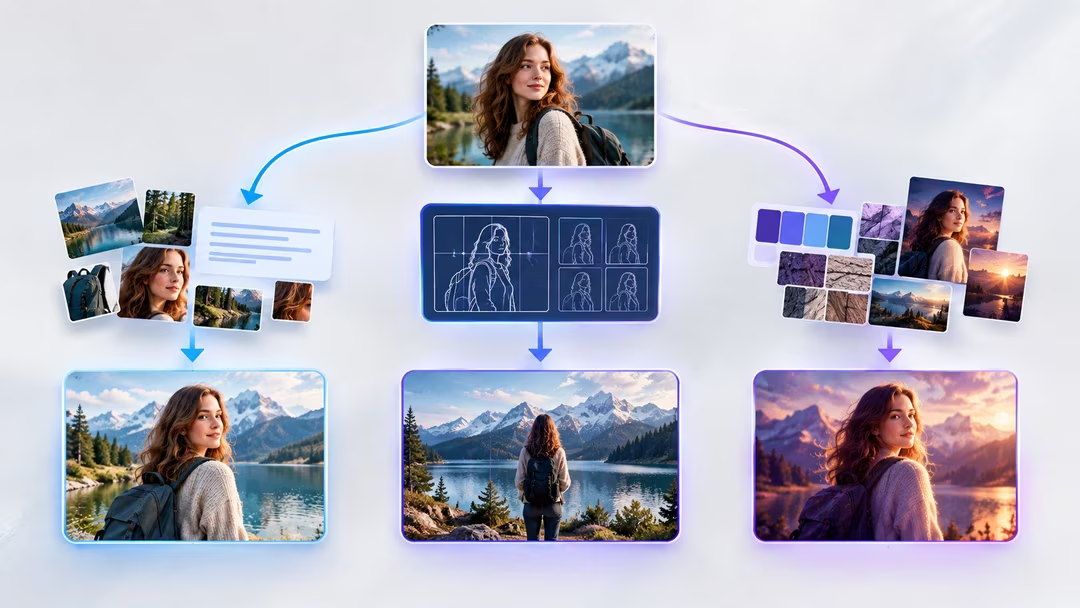
- Image-to-prompt gives you editable words; image-to-image gives you visual gravity; style references give you aesthetic consistency.
- Use image-to-prompt when you need to change the subject; image-to-image when you’re keeping it.
- Combining all three is the professional workflow: structure from words, texture from pixels.
- Reference another creator’s work to learn — never to clone and claim.
The three doors
1. Reference as prompt source
Feed the image to an image-to-prompt tool and get its visual recipe as words. You can then swap any section — subject, setting, palette — while keeping the look. Maximum editability, moderate fidelity.
2. Reference as image-to-image input
The generator uses the pixels themselves as a starting point, preserving composition and texture while your prompt steers changes. High fidelity, lower editability — big structural changes fight the source. See the full comparison.
3. Reference as style anchor
Model-specific features (Midjourney’s style reference, Leonardo’s style upload) extract an aesthetic — palette, texture, rendering — without copying composition. Best for series consistency across different subjects.
When each wins
| Your goal | Best door | Why |
|---|---|---|
| Same look, new subject | Image-to-prompt | Words let you swap the subject cleanly. |
| Same subject, new treatment | Image-to-image | Pixels preserve what words would lose. |
| Consistent brand aesthetic | Style reference | Style travels; composition doesn’t. |
| Learning how a look works | Image-to-prompt | The breakdown is the lesson. |
| Maximum fidelity recreation | Image-to-image + prompt | Both forces aligned. |
Combining workflows
The strongest results usually stack doors. Extract the recipe with the generator to understand the look, then feed the original into image-to-image at a moderate strength while applying the edited prompt. The words set intent; the pixels supply texture the model can’t invent. Adjust strength per goal: low strength for reinterpretation, high for faithful variation.
Keep the reference’s golden-hour backlight, teal-and-amber grade and upper-third horizon. Replace the figure with a moored rowboat and lantern. Image-to-image strength: medium.
Rights & respect
Only use references you have the right to use. Study another creator’s lighting or palette freely; don’t ship recreations of their identifiable work or a real person’s likeness as your own.
FAQ
Which should a beginner start with?
Image-to-prompt. The editable breakdown teaches you the vocabulary that makes the other two workflows controllable.
Why does image-to-image ignore my prompt?
Strength is too high — the pixels outvote the words. Lower it until the prompt’s changes appear.
Can I use multiple references?
Yes: one for composition (image-to-image), one for style (style reference), and the prompt for everything the images can’t say.